


Use what exists
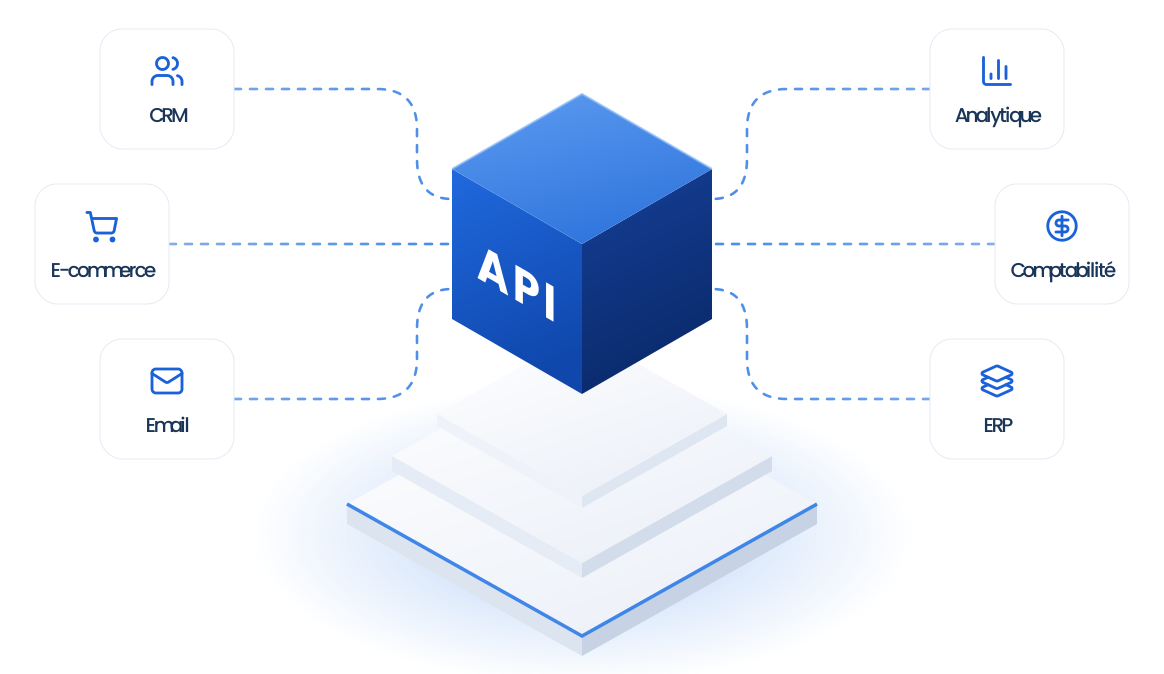
Most platforms already offer APIs or connectors — we activate them for your reality.
Apps & integrations
LookTech connects software already in place at Quebec SMBs — including CRM and ERP — to avoid double entry. When no product covers the need, we build the missing application, such as a client portal or replacement for a critical Excel file. We first verify what your systems can already do.
For SMBs in Laval, Montreal, and the North Shore, we design integrations and web applications remotely, with on-site time when the shop floor or workshop is part of the project.
Double entry between CRM and ERP. Store orders re-keyed into accounting. No overall view because each system has its own report. Shared Excel that breaks when two people open it. Clients emailing for a status already known internally. Adding a fifth tool does not fix these gaps if data still does not flow.
Connect first, build second. We list the exchanges that remove the most re-entry. Vendor APIs and connectors come before custom development. A client portal or business tool is kept only when market software does not cover the process. The source of truth stays in an existing system whenever possible.
Most platforms already offer APIs or connectors — we activate them for your reality.
We target the exchanges that remove the most re-entry and error first.
A custom connector or interface only when the standard path is not enough.
CRM, ERP, online store, accounting — we build the links so information moves between your platforms.
Automated exchanges between your business systems.
Clients, prospects, and opportunities kept in sync.
Finance, inventory, and operations linked.
Orders, stock, and fulfillment connected.
Invoices and payments transferred automatically.
Data centralized from multiple sources.
Your applications tied into the existing ecosystem.
The same information, up to date everywhere.
Actions triggered at the right moment.
Faster, more economical, easier to maintain.
If no existing software covers a critical need — or an interface is missing between two systems — we build the complementary piece.
A client or employee space built on your existing systems — without replacing everything.
A consolidated view when each system’s reports do not show the full picture.
A custom tool for a process no market product truly covers.
Map software and re-entry points. Decide what connects with existing tools and what gets built. Design flows validated with you. Implementation and testing. Follow-up after production. No price is listed for this offer: cost depends on systems and flow count. The diagnostic from $1,500 remains the entry point if that inventory is not done.
Inventory software, data flows, and friction — re-entry, errors, delays.
Identify what can link with existing tools and APIs — and what needs development.
Define which data moves, in which direction, how often — validated with you.
Configure connections, build missing bridges, and test with your teams.
Watch exchanges, fix anomalies, and adapt when tools or processes change.
We favor proven, maintainable integrations. You do not need to understand the stack — only that data arrives in the right place at the right time.
An integration lives with your tools: updates, new versions, API changes. We stay available so connections keep working — and evolve with you.
Keep CRM and ERP in sync — no double entry, fewer mismatches.
View this use caseMove a critical Excel file to a tool your whole team can trust.
View this use caseA secure client space for requests, documents, and status — fewer follow-up emails.
View this use caseCustom software when nothing on the market matches how you work.
View this use caseQuebec SMBs that already own their software and want it to talk — from Laval or elsewhere in the province. Fits CRM and ERP integration, a client portal tied to internal records, or replacing an Excel file several people depend on. Not a fit if the goal is replacing the current ERP without describing the process.
Documented flows: which data, which direction, how often, and what happens when a system does not respond. Access limited to the right people. Test environment before writing to production CRM or ERP. When an application is required: agreed screens and links to source systems. Post-launch support is decided at go-live based on flow criticality.
Integration moves data between systems that stay in place: CRM, ERP, accounting, store. A web application is a screen or tool we build because that path does not exist, or because teams need a view the software does not provide. A client portal is an example: the client tracks a file without calling the office while your systems remain the source. We start by connecting. We build the missing piece only after that.
Often yes, if vendors offer an API or maintained connector. We list fields that must travel — client, order, stock, invoice — and when exchange happens. Double entry drops when one entry becomes the source. We plan for errors: duplicates, empty required fields, unavailable systems. There is no universal connector for every CRM and ERP. Feasibility is checked on your exact versions, not the product name alone.
A portal fits when the same questions repeat: where is my file, which document is missing, what is the next step. It shows information already in CRM, ERP, or your business tool, with access limited to the right client. It does not replace your internal system. LookTech recommends it when email and phone consume measurable time. If request volume is low, a better email template or CRM status may be enough. We will say so.
When the workbook became the working tool for several people: critical formulas, statuses, history, and no reliable trace of who changed what. A shared spreadsheet breaks under concurrent edits. Replacement may be a business tool tied to CRM or ERP, not necessarily a large application. Sometimes integration is enough and Excel stays as an export. The decision comes after opening the file and seeing what it calculates. No replacement price is listed until scope is known.
Both remote and on-site work serve SMBs across Quebec, with LookTech based in Laval. Mapping workshops happen by video. Development and testing use a test environment before production, so we do not write directly into live CRM or ERP. On-site presence is not required. To start, email [email protected] or use the contact page with your software list and one double-entry example.
We monitor flows and fix issues when an API update breaks an exchange. A software version change may require adjustment. That follow-up is discussed at go-live because not every project needs the same level of care. A simple stable integration does not need the same attention as a client portal used daily. We do not leave a production connection without knowing who is alerted if it stops.
Send your software list and one example of data entered twice to [email protected], or use the contact page. Reply within one business day. The call clarifies whether integration is enough or an application is needed.



 Reply within one business day