

Repetitive, time-consuming tasks
Your teams spend hours on entry, copy-paste, and manual follow-ups.
Automation & AI
LookTech automates repetitive tasks for Quebec SMBs and adds AI when content varies and someone can still validate the result. Projects often connect CRM, ERP, and the files that sit in between. The target outcome is less re-entry and visible blockers. Your team repeats the same entries, follow-ups, and copy-paste between email, Excel, and business software.
Our automation and AI projects cover Laval, Montreal, and the rest of Quebec: remote workshops, testing in a safe environment, and on-site work when the process requires it.
Repeated entry between CRM and ERP. Approvals sitting in an inbox. Documents read by hand to pull three fields. Excel macros no one dares touch. AI trials with no effect on real work. Each problem calls for a different answer. A clear rule can be programmed. Variable content may use AI, with a human on exceptions.
Your teams spend hours on entry, copy-paste, and manual follow-ups.
Information does not flow — each system lives on its own.
Requests pile up in email or shared files.
Invoices, forms, and email need a human at every step.
You tested AI tools with no concrete impact on operations.
Scripts or macros break without anyone noticing in time.
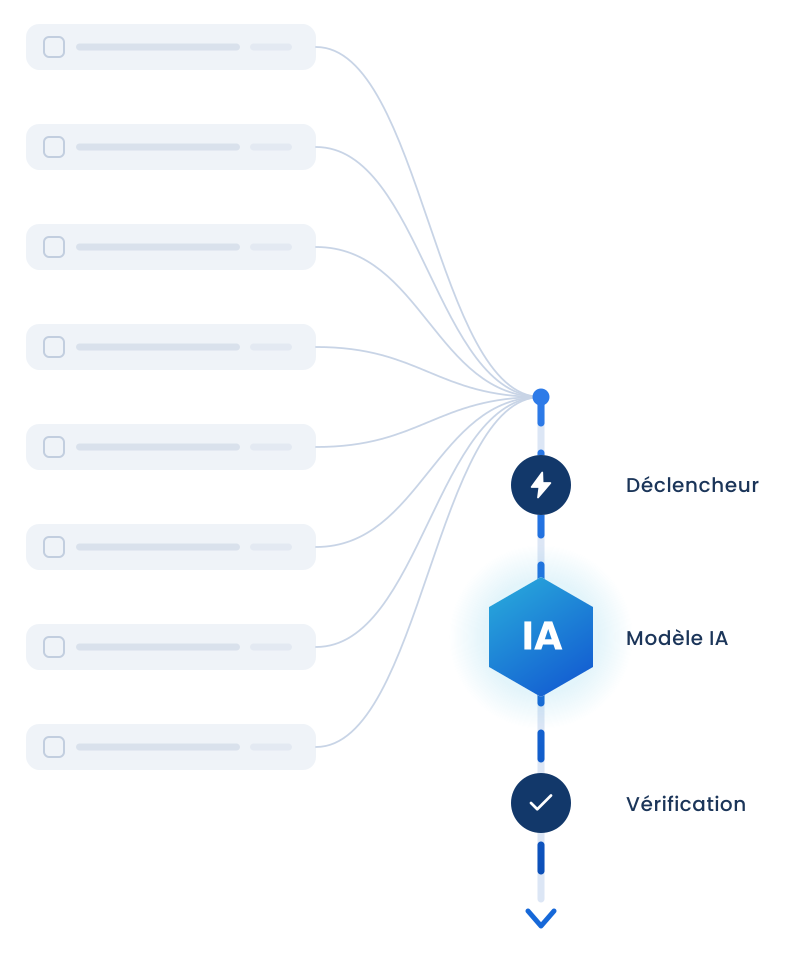
We separate traditional automation from AI for SMBs. The first covers stable conditions: sync, tasks, reminders, forms. The second covers sorting, extraction, and search in your documentation. Both can live in one flow. Human validation stays on costly steps. Trials happen before production.
Best when rules are clear and flows are predictable — fast, reliable, and controllable.
Relevant when content varies — text, documents, classification — and human validation remains possible.
Less manual entry, approvals, and follow-ups — more time for work that matters.
View this use caseKeep CRM and ERP in sync — no double entry, fewer mismatches.
View this use caseContracts, proposals, and reports built from your data — less copy-paste.
View this use caseFind procedures and policies fast — answers from your own documentation.
View this use caseMove a critical Excel file to a tool your whole team can trust.
View this use caseWe connect your software so data moves automatically — without re-entry or middle files.
Internal assistants that answer from your knowledge sources — with guardrails and clear traceability.
Automate reading, extraction, and routing of documents — with human review when required.
Automated paths for requests, approvals, and follow-ups — visible and traceable for the whole team.
Every automation is designed to be reliable, auditable, and supervised — especially when AI is involved.
Process discovery, choice between rule, integration, or AI, step-by-step build, user testing, production launch, and follow-up. There is no fixed duration on the page: a flow between two tools is not the same weight as a multi-role approval path. Scope and build order are confirmed in writing before we build.
Understand the process, users, and expected outcomes.
Choose classic automation, integration, or AI — and define architecture.
Construct workflows, connectors, and AI components in stages.
Validate with users and adjust before production.
Go live, monitor, and improve continuously.
Quebec SMBs that can show a repetitive process and name a business owner. Especially when CRM, ERP, or Excel send the same data back and forth. Less relevant when the rule changes every week or no one can validate edge cases. In that case, the automation diagnostic should come before build work.
A production flow, documented: trigger, systems touched, rules, and what stays manual. Log of automated actions. Recovery points when a system does not respond. For an internal assistant: authorized sources, answer limits, and handoff to a person. No promise of a percentage gain until real volume is measured with you.
Classic automation applies stable rules: when a status changes, create a task, sync a customer between CRM and ERP, send a reminder. AI for SMBs applies when content varies — for example sorting email or extracting fields from a PDF. LookTech picks one, the other, or both in the same flow. Human validation stays where a bad decision is costly. We do not replace an employee with an agent without guardrails or a log of what was done.
Yes, when both systems expose a reliable exchange path, usually an API or vendor-supported connector. We define which records move, in which direction, and what to do with duplicates or empty fields. The goal is to stop double entry, not rebuild CRM or ERP. If one system cannot open cleanly, we say so before promising a continuous flow. Scope is confirmed in writing before development.
A personal list file can stay. A file that is the only place statuses, prices, or client follow-up live deserves to be absorbed by a flow or tool. Automation can fill Excel from CRM, or move data out of Excel into something safer. Full replacement is more often a web application when several people depend on the file and version conflicts create errors. We decide after seeing a real example, not on principle.
Timing depends on system count and exceptions. A simple flow between two tools with clear rules ships faster than a multi-role approval path. We cut work into stages tested with your users before production. There is no universal timeline on the site because a fixed number would be wrong. After the exploratory call you receive scope, build order, and an estimate. The diagnostic from $1,500 remains available when the need is still unclear.
Yes, if your procedures exist in usable documents and someone validates sensitive answers. The assistant searches your documentation. It must not invent a policy that does not exist. LookTech plans identified sources, clear limits on what the assistant can assert, and a path for an employee to reach a colleague. It is not useful if knowledge lives only in two people’s heads. In that case, the first job is documentation, not plugging in a model.
LookTech, based in Laval, delivers these projects for SMBs across Quebec. Design and testing happen remotely with people who run the process. A site visit helps when physical work and software are linked — for example shipping. Contact [email protected] or use the form. Describe the starting tool, destination tool, and one re-entry example. We will say whether a call is enough or a diagnostic should precede development.
Send the starting tool, the destination tool, and one example of re-entry to [email protected], or use the contact page. Reply within one business day. If the need is still fuzzy, we will suggest the diagnostic from $1,500 rather than an oversized build.



 Reply within one business day